Configuring ERP Apps AI OCR for Unit4 ERP
System Overview
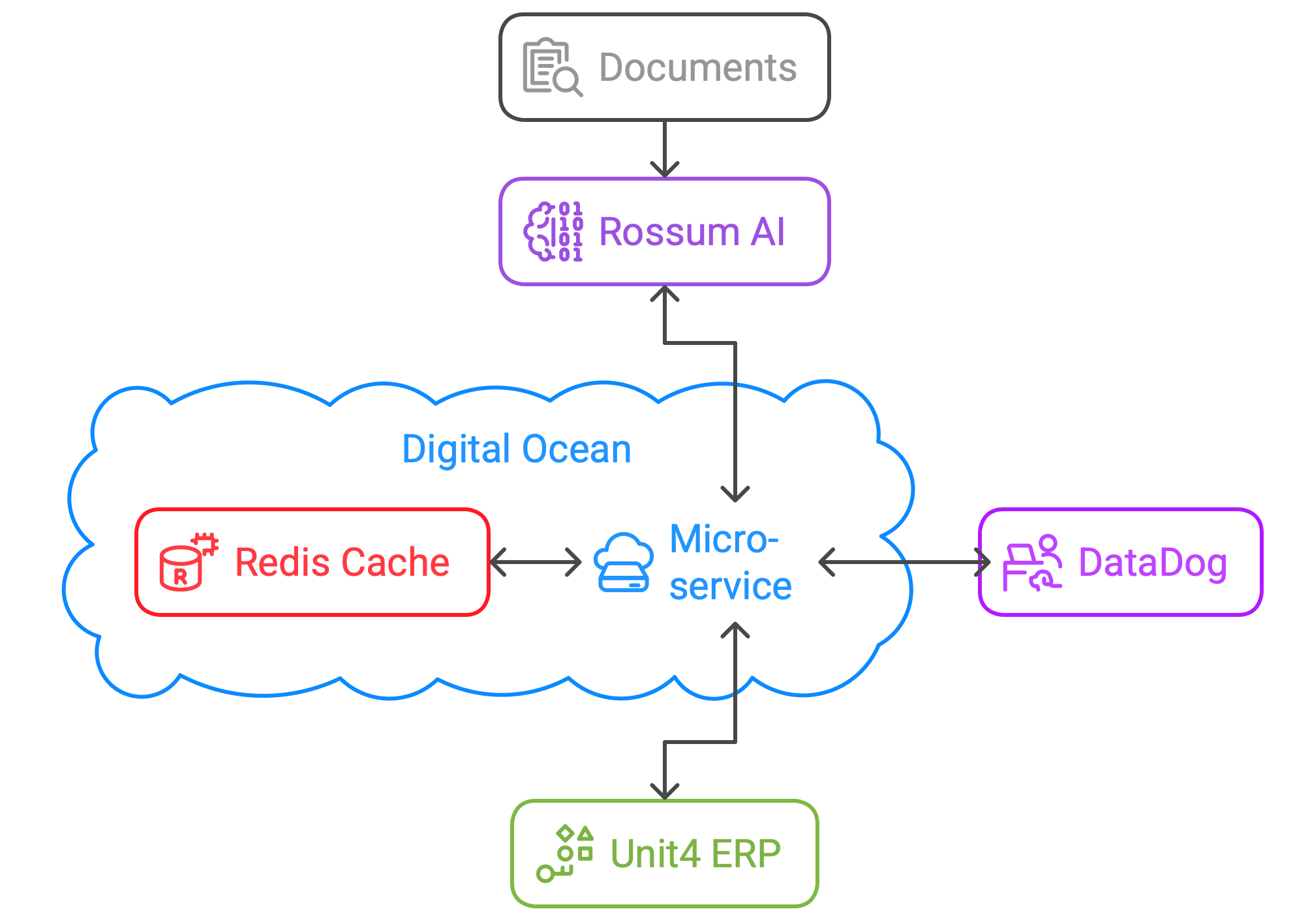
Explanation of Components:
Documents: The initial data that is loaded into Rossum AI for processing either via email or uploaded into the screen
Rossum AI: An AI-powered document processing tool that extracts data from the loaded documents, chosen because it achieves a very high out of the box accuracy, is easy to set up and is highly configurable.
Micro-service on Digital Ocean: Our ERP-Apps AI OCR microservice which searches your Unit4 ERP for matching vendors, orders and accounting information, performs calculations and checks where required and finally formats and sends the data and document to ERP once it is satisfactory.
Unit4 ERP: An enterprise resource planning system.
Redis Cache: A caching system that temporarily stores frequently accessed data from Unit4 ERP, meaning that the system can work faster and we have to make less API calls to ERP.
DataDog: A monitoring service that receives log information from the micro-service for performance tracking and analytics.
System Setup
As shown above, our system is based on the Rossum AI platform and integrates with Unit4 ERP(x)
For this to work as expected there is some configuration required at the Unit4 ERP side, and some further configuration to be completed on the Rossum side.
Both of these setups are very straightforward, and can details can be found in the "Rossum" and "ERP" sections on the navigation, above. If you'd like to set things up for yourself, the information provided should get you up and running. If it seems too technical or you have no-one available inside your organisation to configure the solution for you, you can contact us for support and consulting services.
If self-configuring, the Unit4 ERP steps should be completed first as you'll be creating dedicated users in order to allow secure access to your data, and these details will be needed before configuring Rossum.
The final step is for us to authorise your Rossum queue with an API Key which we provide to you. If you are not currently an ERP Apps customer and are interested in trying this solution for your Unit4 ERP installation, please get in touch for pricing and connection details via our main website at erp-apps.com
Invoices vs Statement Matching
The information below, and most of this configuration guide, describes the invoice flow. We also offer a separate statement matching product, which reconciles supplier statement lines against your Unit4 ERP transactions rather than processing invoices.
Statement matching is set up as its own Rossum queue and extension (separately licensed), following the same overall pattern described here. If you are setting this up, see creating the statement extension, the statement extension configuration reference, and the statement matching user guide.
Pre-Setup considerations
We have built the system to be flexible in terms of its configuration which means there are a few things to consider when setting the system up.
Queues / Clients / Entities
Please note that each Rossum queue is billable.
If you are a multi client system you may be wondering the best way to set the system up.
The best way for a simple client set-up is to have a queue and extension per client and set the client in the extension settings.
You could also choose to have one queue and extension (without the client parameter set), then identify the client code on each individual invoice. You could do this using Rossum formula fields or even writing your own extra Rossum extension to (See Rossum's documentation for more details). It should be noted that if a client isn't provided in either the extension settings or on the document, this will hamper the invoice processing until a client code is provided.
If you are using legal entities the most straightforward way to configure the system is to have a Rossum queue and extension per client and legal entity combination, then use the extension setup to configure your client parameter and add in the default legal entity coding into the relevant dim. However, you may choose to just have a single queue per client and then use our extension to handle the entity coding based on identified customer information or even simply handle the entity coding either in Unit4.
Automation
It is possible to set Rossum and the system up to automatically process documents which meet automation thresholds. These will never need to be touched in Rossum and will post straight into Unit4.
You may also need to provide some default coding for this to work, see the next section.
Invoice coding (Non PO and PO extra lines)
Our system enables you to code up invoices within the Rossum screen, or you may opt to use some default coding then capture the invoices in workflow (usually based on a dummy account) to code in a standard Unit4 screen.
If you choose to code in Rossum then each invoice where the coding can not be determined (Non PO or PO extra lines) will need to be coded in Rossum.
However, if you wish to automate invoices you will need to provide the system with some default coding to allow the invoices to process into EI02